ANDRE

GOUVEA

An illustrative sketch of a flower

Compliance Ecosystem

SYSTEMS THINKING

UX DESIGN

PRODUCT ARCHITECTURE

Facility managers were juggling spreadsheets, emails, and paper logs. Things got missed. Compliance was reactive instead of controlled.

  • Product: Snapfix (web)
  • Problem: Compliance managed across spreadsheets, emails, and paper logs No single view. High operational risk.
  • My Role: Led UX strategy, structure, and design - concept through to delivery
  • Outcome: New compliance module adopted immediately without onboarding shipped to 600+ hotels

1 |Intro

Snapfix is a maintenance and operations platform used across 600+ hotels globally, supporting high-volume workflows including over 1M+ work orders and inspections.

As part of the core product, I led the design of a new compliance management system, enabling teams to track regulatory requirements, manage documentation, and monitor system status across multiple sites.

The challenge was to translate complex, rule-based compliance processes into a clear, reliable interface that supports day-to-day decision-making for operational teams.

2 |Opportunity

When I looked at how teams managed compliance, it wasn’t really a system.

Facility managers were juggling spreadsheets, emails, shared drives, and paper logs just to stay compliant.

That created a few consistent problems:

  • No clear view of what was expiring
  • Contractor documents scattered across tools
  • Tasks tracked only after something went wrong
  • High operational risk, low visibility

This wasn’t a usability issue. It was a systems problem.

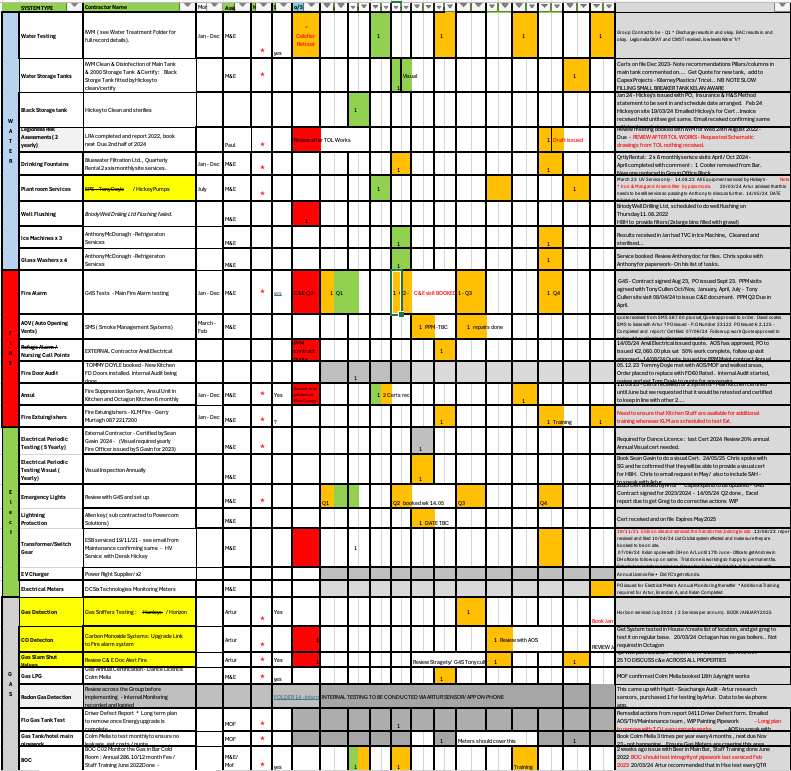
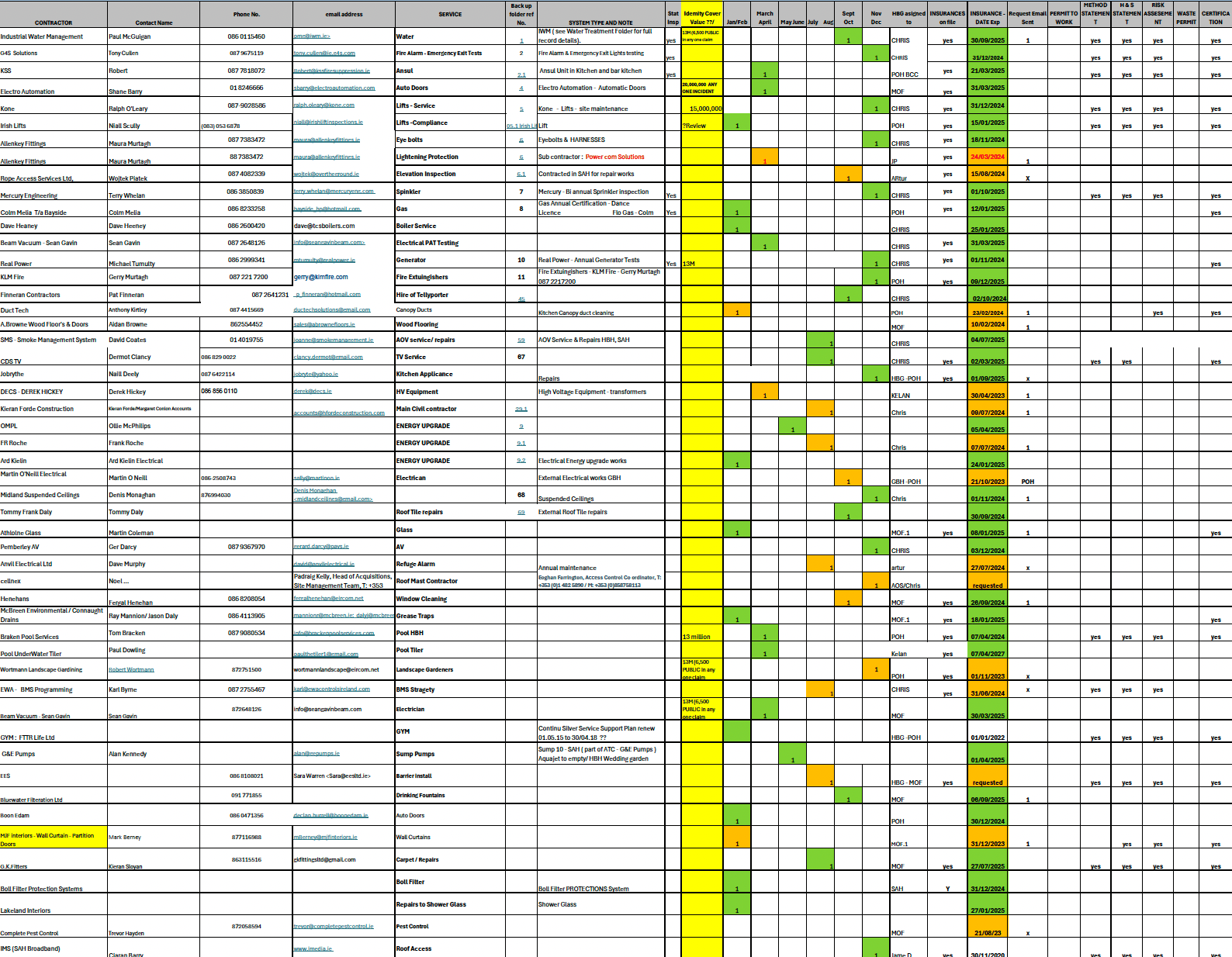
  • Before | Compliance System & Contractors spreadsheet

    These are actual spreadsheets used by a large, well-established hotel chain. Alongside these, compliance was managed through notes, paper and digital documents, PPM schedules, and calendar reminders.
3 |Outcome

A new compliance capability was introduced within Snapfix, expanding the product beyond task management into structured compliance workflows.

The feature generated strong customer interest and positioned Snapfix as a more complete operational platform for hospitality and facilities teams.

The system is used in real operational environments, where clarity, reliability, and accuracy directly impact compliance and day-to-day decision-making.

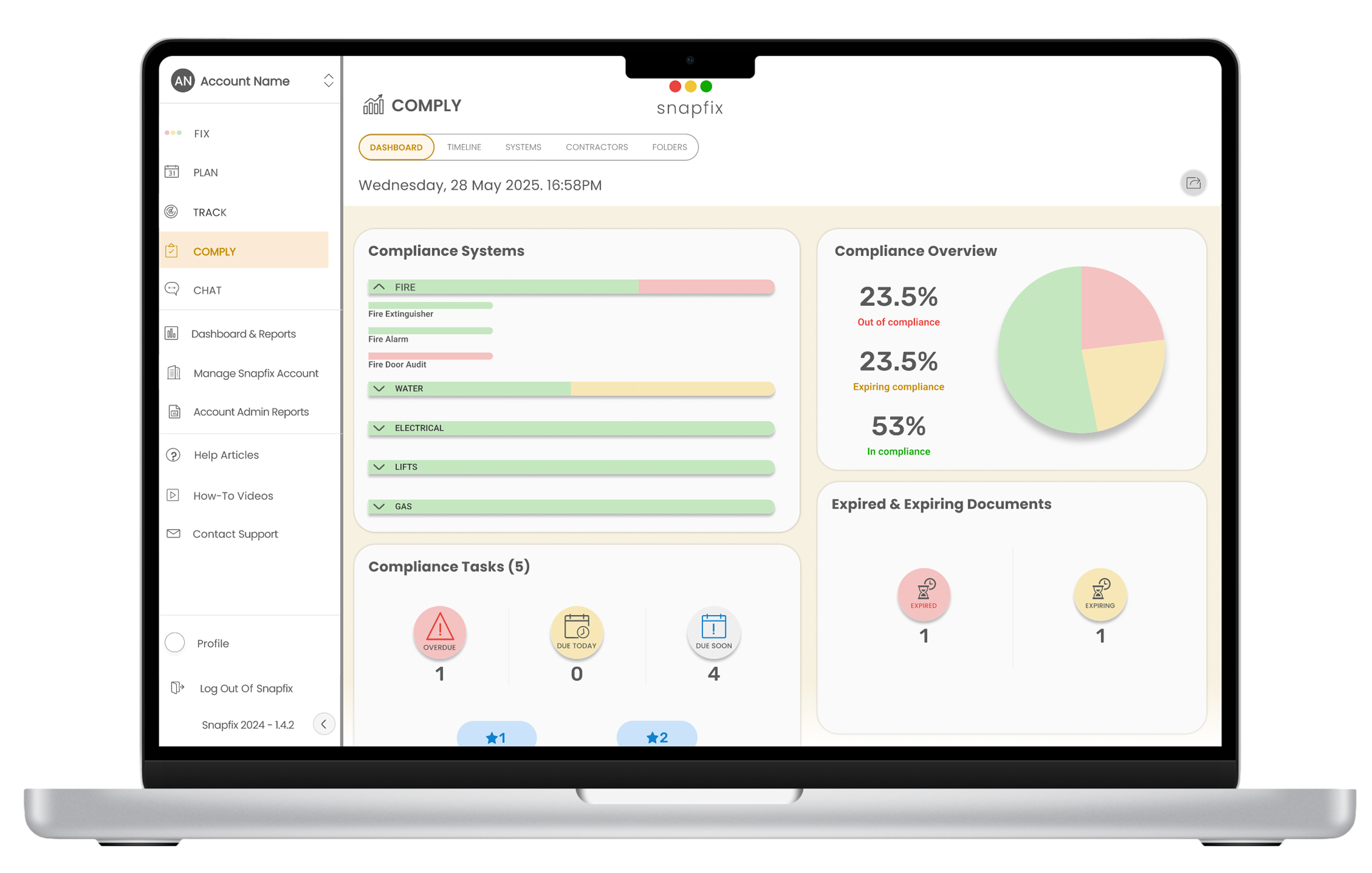
  • After | Compliance Dashboard Report

    The Dashboard consolidated only the relevant information, on click, managers could see exacty what spreadsheets used by a large, well-established hotel chain. Alongside these, compliance was managed through notes, paper and digital documents, PPM schedules, and calendar reminders.
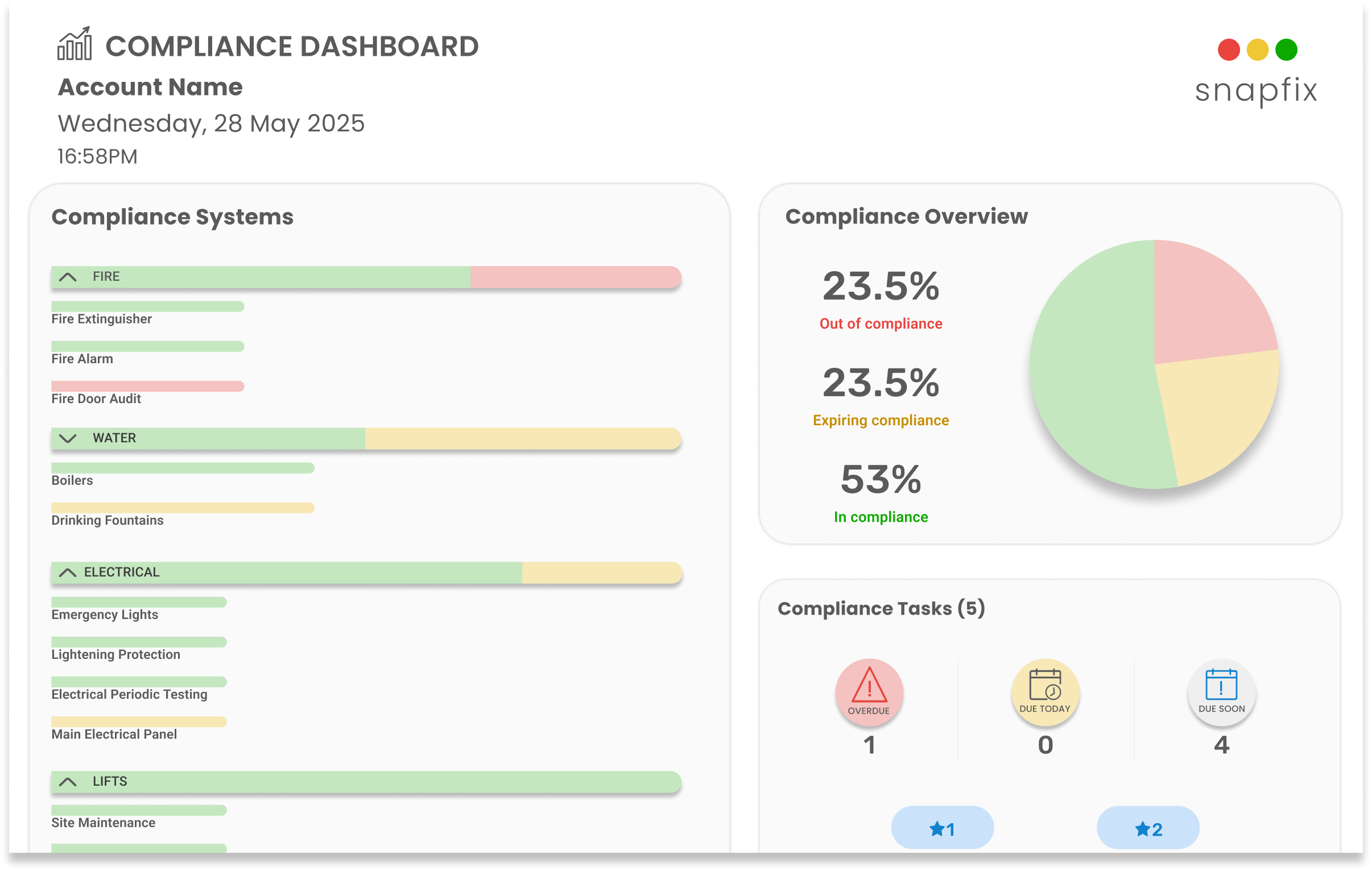
“Staff picked it up immediately without training.”

How did I get here?

4 |My Role

I led the end-to-end design of the compliance system, from early concept and workflow definition through to detailed interaction design and implementation support.

I worked closely with product, engineering, and stakeholders to define system behaviours, structure data models, and ensure the solution reflected real operational workflows.

5 |Research

Product and Customer Success were already getting repeated requests for a compliance feature. Both existing and potential customers were asking for it, which pointed to a gap.

To understand how compliance was being managed, I spoke with facility managers, hotel managers, fire officers and safety inspectors. I also reviewed their existing workflows and looked at how current tools approached the problem.

What I saw

  • Compliance information lived in different places - spreadsheets, shared drives, calendars, and maintenance tools
  • No single system covered the full process, so teams were stitching things together
  • The tools that did exist were seen as complex and hard to use
  • Managers didn’t have a clear view of what was expiring or what needed attention
  • Contractor documentation and insurance were difficult to keep up to date
  • Most of the work was reactive and things were dealt with when they became a problem

Across interviews and tools, the pattern was the same.Compliance was fragmented, hard to track, and not well supported by existing solutions.

This defined the opportunity: bring everything into one place and make it easier to stay ahead of it.

6 |Key Challenge

The core challenge was designing for clarity in a system driven by rules, statuses, and time-based conditions.

Users needed to quickly understand:

  • what is compliant
  • what is at risk
  • what requires immediate action

The system had to surface critical information clearly, reduce cognitive load, and support fast, confident decision-making.

7 |Design Decisions

My intention was not to introduce compliance as a separate product inside Snapfix. It was to make it feel like a natural extension of the workflows users already understood.

Snapfix already had a familiar mental model built around groups, tasks, and workflow states. Reusing that structure was a deliberate decision: it reduced the learning curve, avoided creating parallel logic, and made the new module feel immediately recognisable to existing users.

Instead of inventing a new hierarchy, compliance system types followed the same structural logic as group layouts, while individual systems and assets used patterns already familiar from task organisation. This created continuity across the product and helped users transfer existing knowledge into a more complex domain.

This was also important at a product level. Positioning Comply within the broader Snapfix architecture made it clear that compliance was not a disconnected add-on, but part of a wider operational system linking tasks, planning, documentation, and accountability

How it was structured

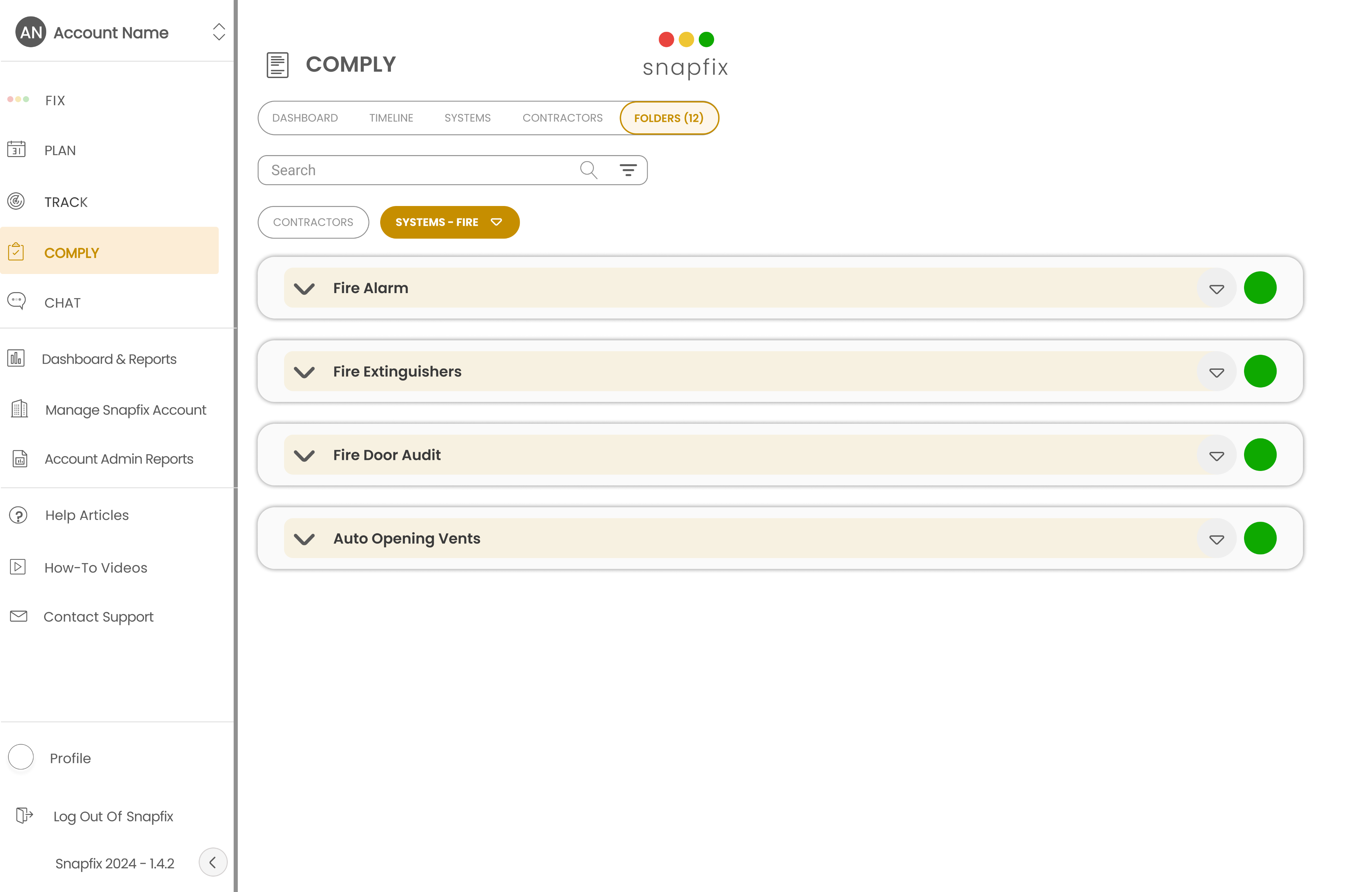
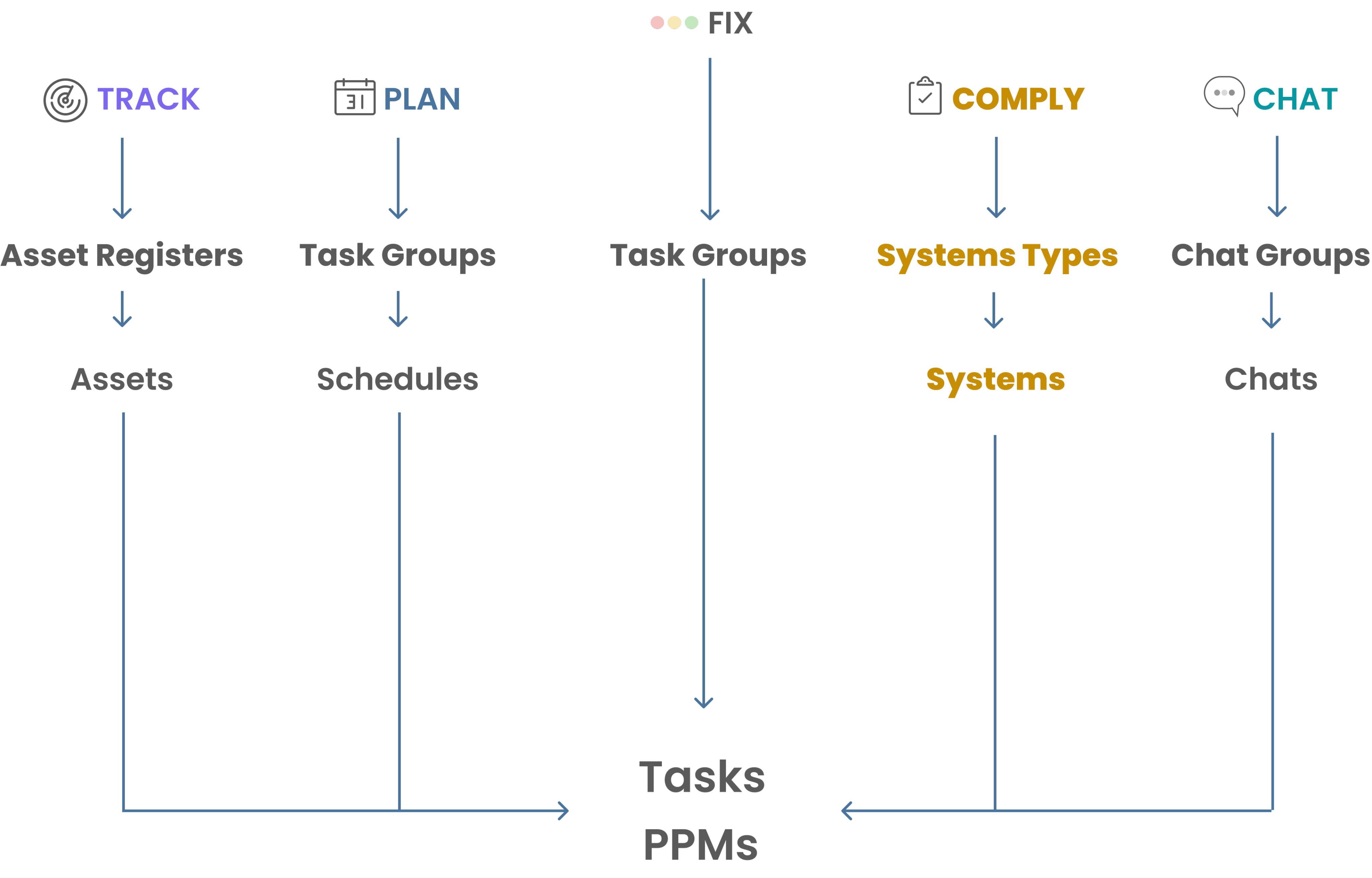
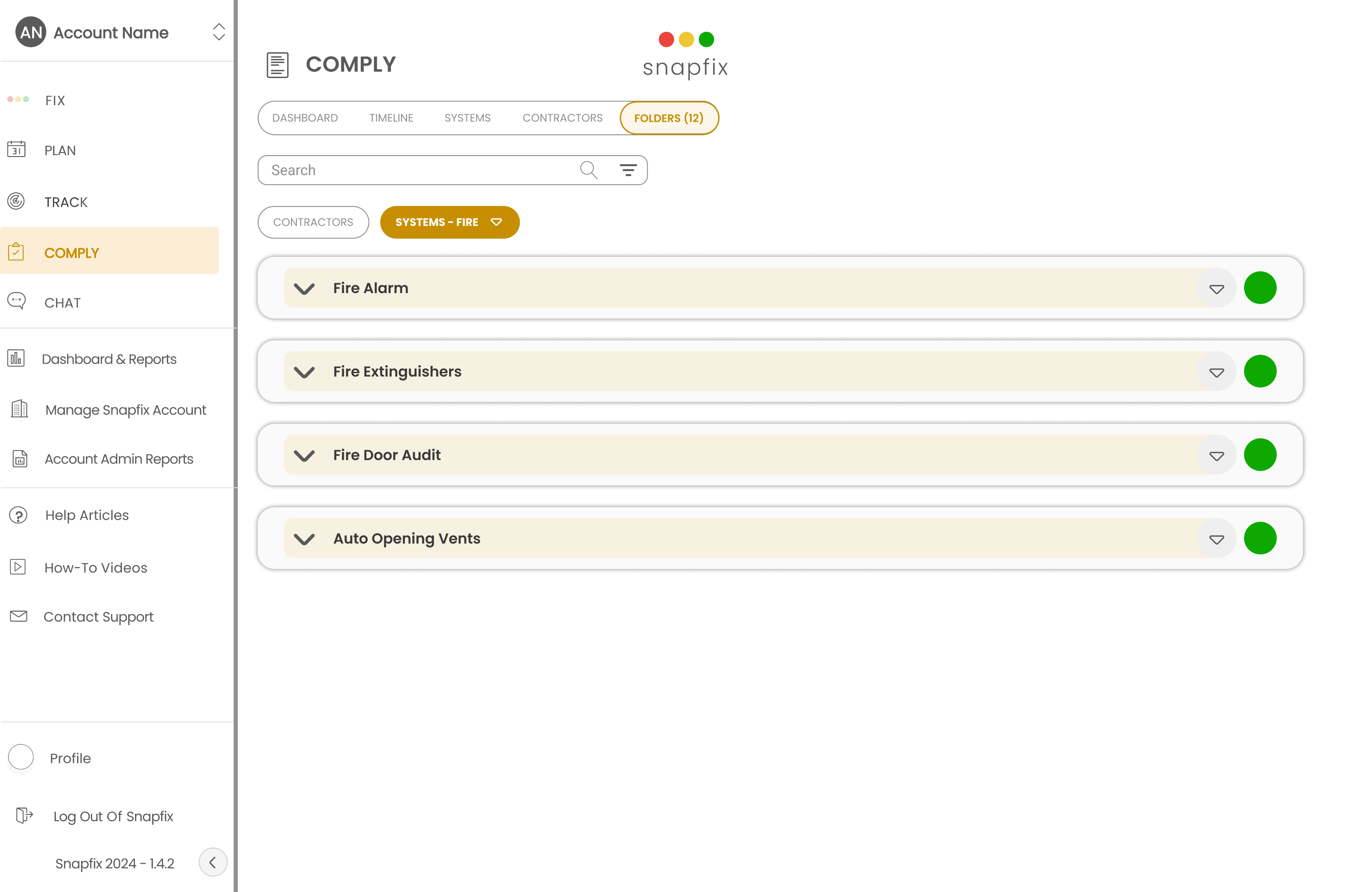
The existing group layout was used to as a model for the compliance system types layout (fire, water, gas)

The task structure was used to do the same to individual systems and assets (fire doors, extinguishers, alarms)

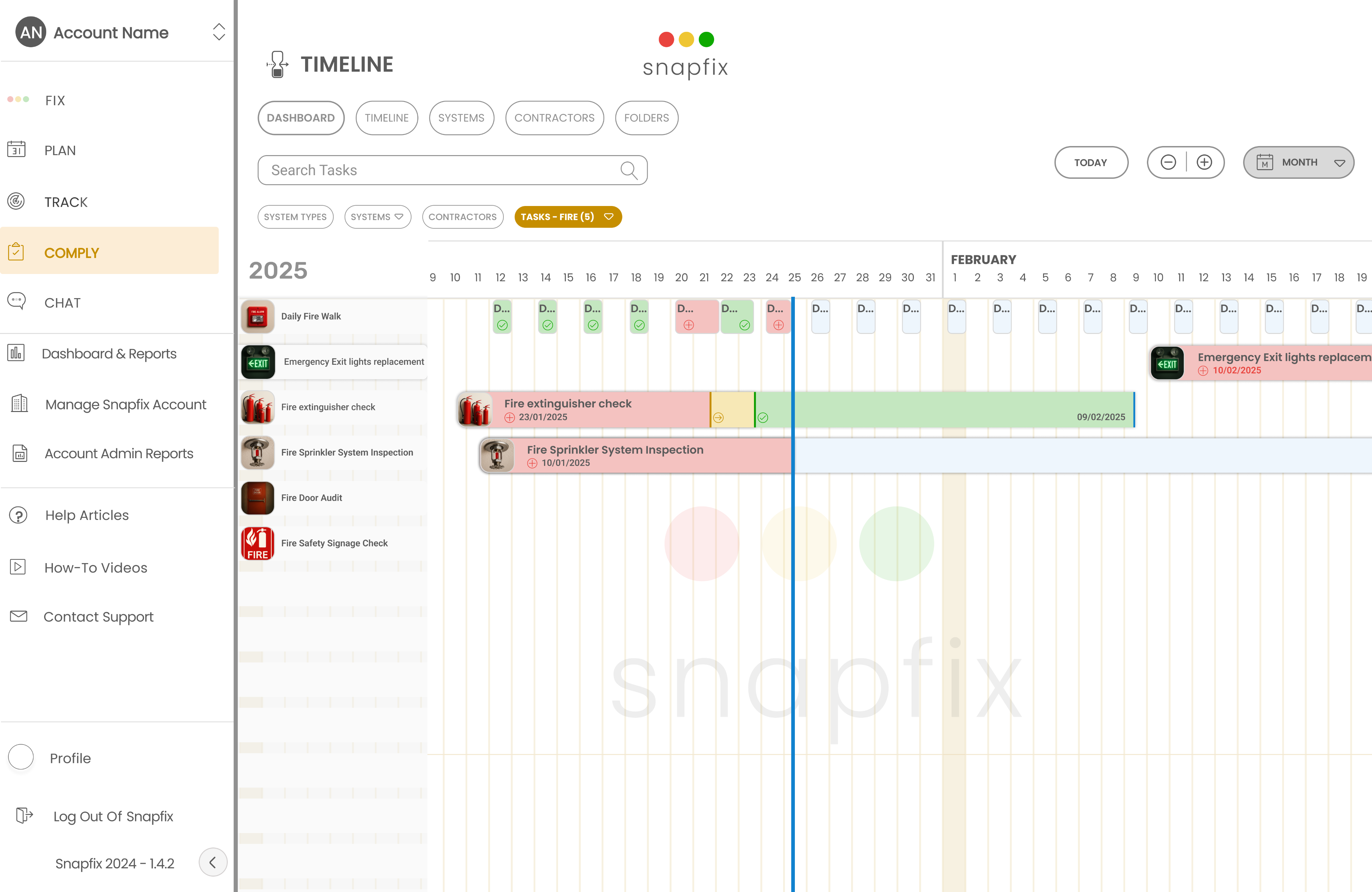
Reactive tasks and PPMs remained unchanged, but compliance-related items were marked with a badge and supported by new filters

This meant users didn’t need to learn a new system. They were already familiar with the structure - it just carried more meaning.
Design Principles

These weren’t abstract principles. They came directly from what was observed during research.

Clarity over complexityCompliance can become overwhelming quickly. Information was structured with clear status indicators and simple hierarchies so users could understand what mattered at a glance

ConsistencyExisting patterns, language, and interactions were reused. Users didn’t have to relearn how the system worked

Visibility of statusManagers needed to know what was coming. Expiry dates and upcoming actions were surfaced clearly so work could be planned, not reacted to

Centralisation of informationDocuments, contractors, and tasks were connected in one place. Users no longer needed to switch between tools to understand the full picture

Affordance Actions were kept obvious. If something could be clicked, edited, or updated, it looked that way

8 |Solution

The research and design decisions pointed in the same direction.Compliance wasn’t missing because of a single feature. It was missing because the process was fragmented.

The solution needed to fit into how Snapfix already worked, while covering the full compliance workflow.

This led to a clear outcome: a new module, Comply, introduced alongside Plan, Track, Chat, and Fix.

It followed the same structure and mental model, so it felt familiar from the start.

For compliance to work in practice, it needed to:

  • Track requirements across multiple locations
  • Manage contractor information and documentation
  • Monitor document expiry dates
  • Alert users before actions were due

This wasn’t a small addition.It required a system that could connect information, surface risk, and support ongoing management.How it was structured

Rather than a single feature, Comply was designed as a connected system with four parts:
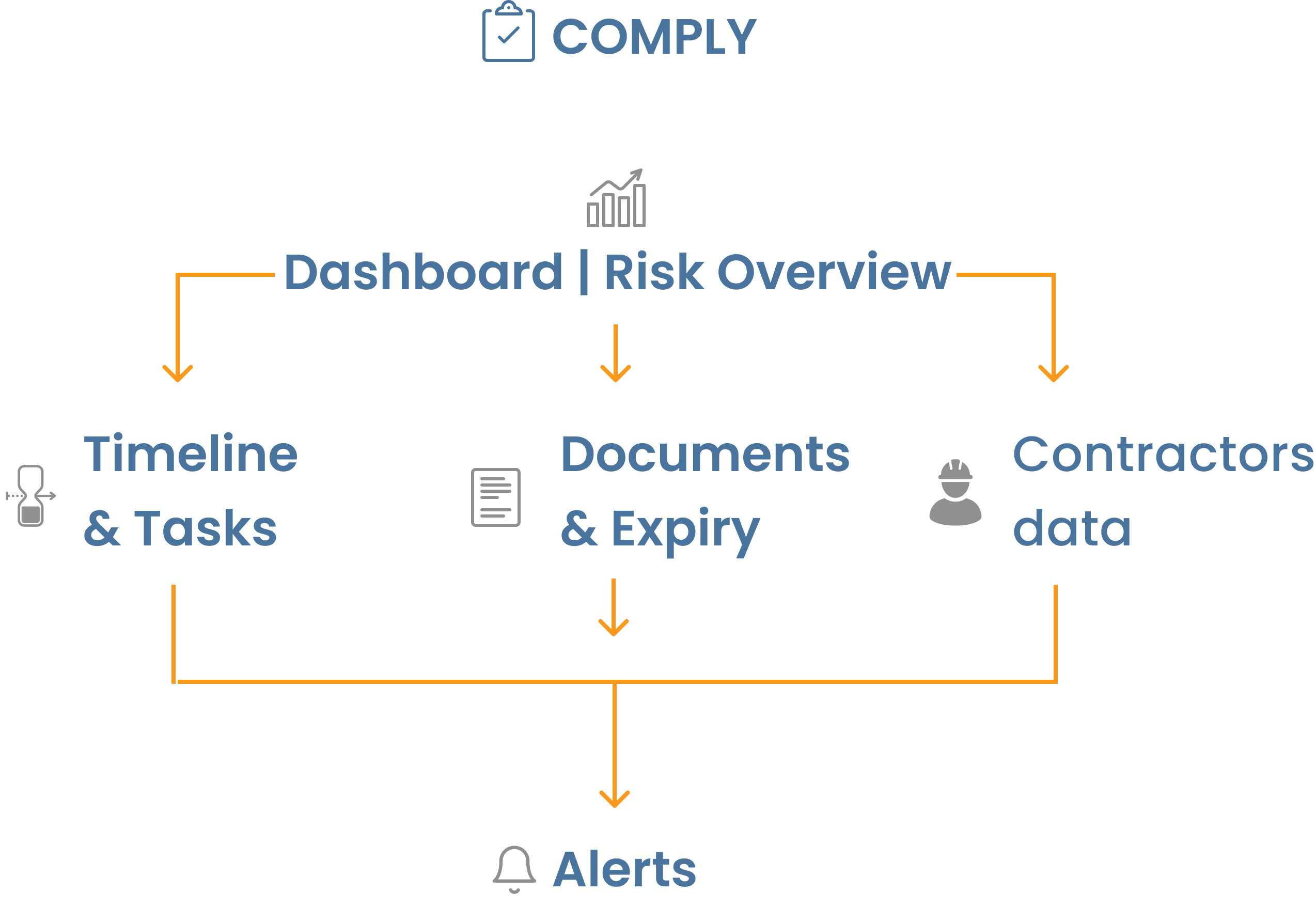
  • Proactive dashboard

    Shows what’s compliant, what’s at risk, and what needs action.

  • Timeline and task tracking

    Shows compliance tasks over time, so managers can see what’s due, overdue, and coming up.

  • Document management

    Keeps compliance documents in one place, with expiry dates tracked and surfaced when they’re approaching.

  • Contractor oversight

    Tracks contractor details and insurance, making it easier to see who is compliant and who needs attention.
9 |Validation

The initial rollout was kept quiet.

The module was released without broad promotion and shared directly with a small group of existing customers who had already expressed the need for a compliance solution.

This made it possible to observe real usage without forcing adoption.

What happened

  • Users were able to start using the module immediately, without onboarding
  • Compliance data and documents were added from the start
  • Workflows were understood without explanation
  • This suggested the structure and patterns were already familiar enough

Some usage went beyond the initial scope.

A number of customers started using Comply to track staff visas and training records.This wasn’t part of the core V1 focus, but it aligned with how the system was designed.

It showed the model could extend beyond compliance without needing to change the structure.

10 |Impact

Comply introduced a new capability within Snapfix, expanding the product beyond task management into structured compliance workflows. It brought documents, contractors, timelines, and risk visibility into one connected system, reducing reliance on fragmented tools and manual tracking.

It also strengthened Snapfix’s position as a more complete operational platform for hospitality and facilities teams. More importantly, it shifted compliance from something teams reacted to after problems appeared into something they could monitor and manage proactively.

11 |Reflection

One of the most useful lessons from this project was that compliance did not need a completely separate experience. By building on patterns users already understood, the system felt easier to adopt and more trustworthy from the start.

The next step would be reducing setup effort. While the structure worked well once data was in place, contractor onboarding, document upload, and system configuration still relied on manual effort. A future version should focus on making setup faster, lighter, and more automated.Next Iteration

The first version proved that the model was usable and flexible. The next step would be making the system more proactive and easier to set up.

  1. AI-assisted risk dashboardRather than surfacing all information equally, a future dashboard could prioritise only what needs attention: overdue items, near-term expiry risks, missing documentation, and unusual gaps in compliance data. This would reduce scanning and help managers focus faster.
  2. Faster setup through automationA major opportunity is simplifying the setup of contractors, systems, and documents. Automations could reduce manual admin, trigger reminders, and support recurring compliance workflows with less effort.
  3. AI-assisted document parsingDocument upload could be improved with AI support that reads files and suggests key information such as expiry dates, insurer details, contractor names, policy numbers, notes, and contact information. This would reduce setup friction and improve data quality.
  4. Extending the model to people operationsThe same structure could support staff-related records such as training, certifications, visa documentation, and leave planning, with timeline-based visibility similar to contractor and compliance tracking. This would build on behaviour already seen during validation, where customers used the system beyond its initial scope.

There are still areas to evolve but the foundation now supports proactive compliance at scale.

About me

Get in Touch

ANDRE

GOUVEA

An illustrative sketch of a flower

Compliance Ecosystem

SYSTEMS THINKING

UX DESIGN

PRODUCT ARCHITECTURE

Facility managers were juggling spreadsheets, emails, and paper logs. Things got missed. Compliance was reactive instead of controlled.

  • Product: Snapfix (web)
  • Problem: Compliance managed across spreadsheets, emails, and paper logs No single view. High operational risk.
  • My Role: Led UX strategy, structure, and design - concept through to delivery
  • Outcome: New compliance module adopted immediately without onboarding shipped to 600+ hotels

1 |Intro

Snapfix is a maintenance and operations platform used across 600+ hotels globally, supporting high-volume workflows including over 1M+ work orders and inspections.

As part of the core product, I led the design of a new compliance management system, enabling teams to track regulatory requirements, manage documentation, and monitor system status across multiple sites.

The challenge was to translate complex, rule-based compliance processes into a clear, reliable interface that supports day-to-day decision-making for operational teams.

2 |Opportunity

When I looked at how teams managed compliance, it wasn’t really a system.

Facility managers were juggling spreadsheets, emails, shared drives, and paper logs just to stay compliant.

That created a few consistent problems:

  • No clear view of what was expiring
  • Contractor documents scattered across tools
  • Tasks tracked only after something went wrong
  • High operational risk, low visibility

This wasn’t a usability issue. It was a systems problem.

  • Before | Compliance System & Contractors spreadsheet

    These are actual spreadsheets used by a large, well-established hotel chain. Alongside these, compliance was managed through notes, paper and digital documents, PPM schedules, and calendar reminders.

3 |Outcome

Introduced a new compliance capability within Snapfix, expanding the product beyond task management into structured compliance workflows.

The feature generated strong customer interest and positioned Snapfix as a more competitive operational platform for hospitality and facilities teams.

The system is used in real operational environments, where clarity, reliability, and accuracy directly impact compliance and day-to-day decision-making.

After | Compliance Dashboard Report

The dashboard surfaces only what’s needed to stay compliant.Managers can quickly see what’s overdue, what’s at risk, and what needs attention next - including expiring documents and upcoming priority tasks.

Staff picked it up immediately without training.

Customer review

Hotel Tech Report

How did I get here?

4 |My Role

I led the end-to-end design of the compliance system, from early concept and workflow definition through to detailed interaction design and implementation support.

I worked closely with product, engineering, and stakeholders to define system behaviours, structure data models, and ensure the solution reflected real operational workflows.

5 |Research & Findings

Product and Customer Success were already getting repeated requests for a compliance feature. Both existing and potential customers were asking for it, which pointed to a gap.

To understand how compliance was being managed, I spoke with facility managers, hotel managers, fire officers and safety inspectors. I also reviewed their existing workflows and looked at how current tools approached the problem.

What I saw

  • Compliance information lived in different places - spreadsheets, shared drives, calendars, and maintenance tools
  • No single system covered the full process, so teams were stitching things together
  • The tools that did exist were seen as complex and hard to use
  • Managers didn’t have a clear view of what was expiring or what needed attention
  • Contractor documentation and insurance were difficult to keep up to date
  • Most of the work was reactive and things were dealt with when they became a problem

Across interviews and tools, the pattern was the same.Compliance was fragmented, hard to track, and not well supported by existing solutions.

This defined the opportunity: bring everything into one place and make it easier to stay ahead of it.

6 | Key Challenge

The core challenge was designing for clarity in a system driven by rules, statuses, and time-based conditions.

Users needed to quickly understand:

  • what is compliant
  • what is at risk
  • what requires immediate action

The system had to surface critical information clearly, reduce cognitive load, and support fast, confident decision-making.

7 | Design Decisions

My intention was not to introduce compliance as a separate product inside Snapfix. It was to make it feel like a natural extension of the workflows users already understood.

Snapfix already had a familiar mental model built around groups, tasks, and workflow states. Reusing that structure was a deliberate decision: it reduced the learning curve, avoided creating parallel logic, and made the new module feel immediately recognisable to existing users.

Instead of inventing a new hierarchy, compliance system types followed the same structural logic as group layouts, while individual systems and assets used patterns already familiar from task organisation. This created continuity across the product and helped users transfer existing knowledge into a more complex domain.

This was also important at a product level. Positioning Comply within the broader Snapfix architecture made it clear that compliance was not a disconnected add-on, but part of a wider operational system linking tasks, planning, documentation, and accountability

How it was structured

The existing group layout was used as a model for the compliance system types layout (fire, water, gas)

The task structure was used to do the same to individual systems and assets (fire doors, extinguishers, alarms)

Reactive tasks and PPMs remained unchanged, but compliance-related items were marked with a badge and supported by new filters

This meant users didn’t need to learn a new system. They were already familiar with the structure - it just carried more meaning.

Design Principles

These weren’t abstract principles. They came directly from what was observed during research.

Clarity over complexityCompliance can become overwhelming quickly. Information was structured with clear status indicators and simple hierarchies so users could understand what mattered at a glance

ConsistencyExisting patterns, language, and interactions were reused. Users didn’t have to relearn how the system worked

Visibility of statusManagers needed to know what was coming. Expiry dates and upcoming actions were surfaced clearly so work could be planned, not reacted to

Centralisation of informationDocuments, contractors, and tasks were connected in one place. Users no longer needed to switch between tools to understand the full picture

AffordanceActions were kept obvious. If something could be clicked, edited, or updated, it looked that way

8 | Solution

The research and design decisions pointed in the same direction.Compliance wasn’t missing because of a single feature. It was missing because the process was fragmented.

The solution needed to fit into how Snapfix already worked, while covering the full compliance workflow.

This led to a clear outcome: a new module, Comply, introduced alongside Plan, Track, Chat, and Fix.

It followed the same structure and mental model, so it felt familiar from the start.

For compliance to work in practice, it needed to:

  • Track requirements across multiple locations
  • Manage contractor information and documentation
  • Monitor document expiry dates
  • Alert users before actions were due

This wasn’t a small addition.It required a system that could connect information, surface risk, and support ongoing management.How it was structured

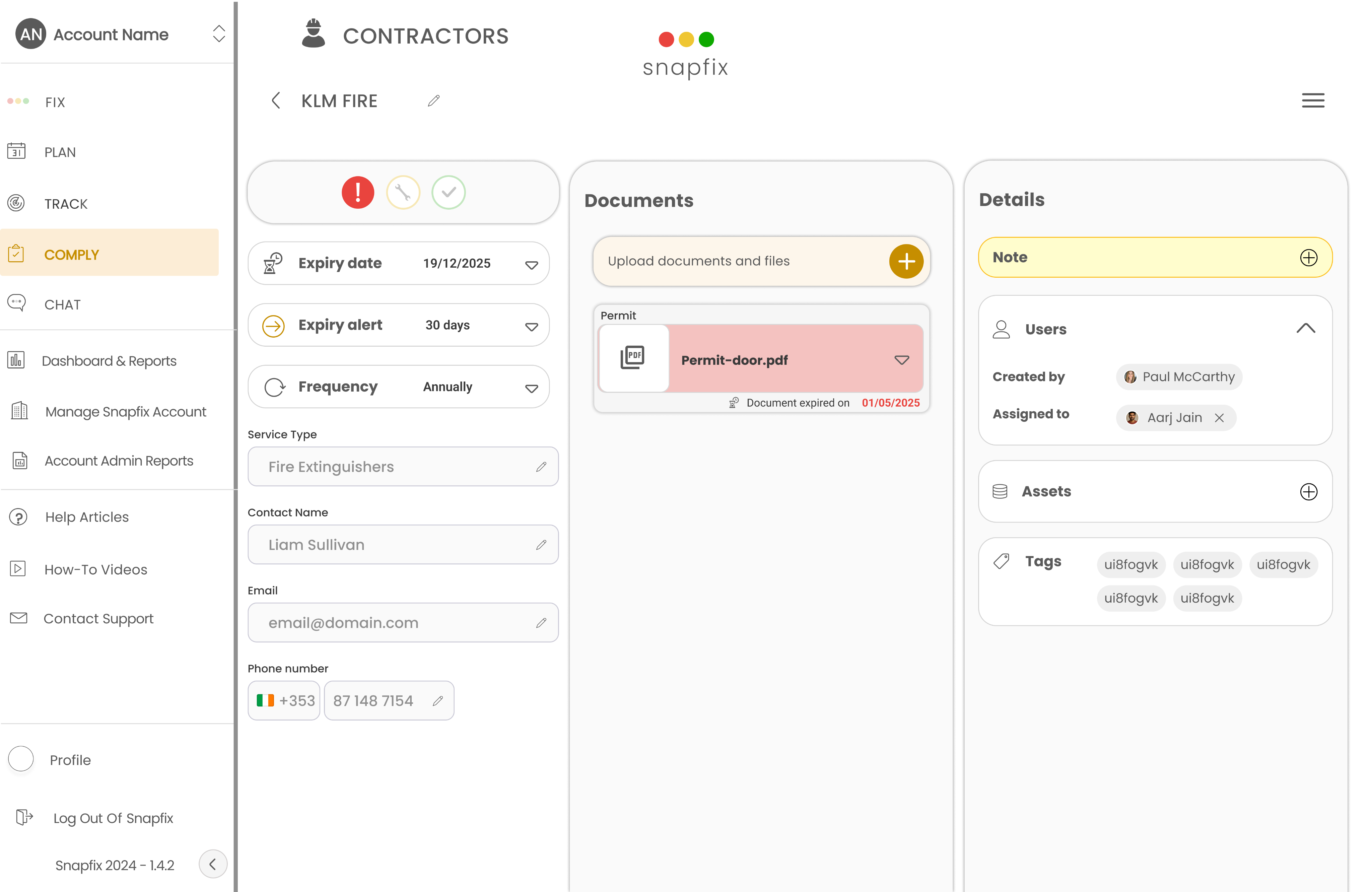
Rather than a single feature, Comply was designed as a connected system with four parts:

  • Proactive dashboard

    Shows what’s compliant, what’s at risk, and what needs action.

  • Timeline and task tracking

    Shows compliance tasks over time, so managers can see what’s due, overdue, and coming up.

  • Document management

    Keeps compliance documents in one place, with expiry dates tracked and surfaced when they’re approaching.

  • Contractor oversight

    Tracks contractor details and insurance, making it easier to see who is compliant and who needs attention.
  • 9 | Validation

    The initial rollout was kept quiet.

    The module was released without broad promotion and shared directly with a small group of existing customers who had already expressed the need for a compliance solution.

    This made it possible to observe real usage without forcing adoption.

    What happened

    • Users were able to start using the module immediately, without onboarding
    • Compliance data and documents were added from the start
    • Workflows were understood without explanation
    • This suggested the structure and patterns were already familiar enough

    Some usage went beyond the initial scope.

    A number of customers started using Comply to track staff visas and training records.This wasn’t part of the core V1 focus, but it aligned with how the system was designed.

    It showed the model could extend beyond compliance without needing to change the structure.

    9 | Validation

    The initial rollout was kept quiet.

    The module was released without broad promotion and shared directly with a small group of existing customers who had already expressed the need for a compliance solution.

    This made it possible to observe real usage without forcing adoption.

    What happened

    • Users were able to start using the module immediately, without onboarding
    • Compliance data and documents were added from the start
    • Workflows were understood without explanation
    • This suggested the structure and patterns were already familiar enough

    Some usage went beyond the initial scope.

    A number of customers started using Comply to track staff visas and training records.This wasn’t part of the core V1 focus, but it aligned with how the system was designed.

    It showed the model could extend beyond compliance without needing to change the structure.

  • 10 | Impact

    Comply introduced a new capability within Snapfix, expanding the product beyond task management into structured compliance workflows. It brought documents, contractors, timelines, and risk visibility into one connected system, reducing reliance on fragmented tools and manual tracking.

    It also strengthened Snapfix’s position as a more complete operational platform for hospitality and facilities teams. More importantly, it shifted compliance from something teams reacted to after problems appeared into something they could monitor and manage proactively.

  • 11 | Reflection

    One of the most useful lessons from this project was that compliance did not need a completely separate experience. By building on patterns users already understood, the system felt easier to adopt and more trustworthy from the start.

    The next step would be reducing setup effort. While the structure worked well once data was in place, contractor onboarding, document upload, and system configuration still relied on manual effort. A future version should focus on making setup faster, lighter, and more automated.Next Iteration

    The first version proved that the model was usable and flexible. The next step would be making the system more proactive and easier to set up.

    1. AI-assisted risk dashboardRather than surfacing all information equally, a future dashboard could prioritise only what needs attention: overdue items, near-term expiry risks, missing documentation, and unusual gaps in compliance data. This would reduce scanning and help managers focus faster.
    2. Faster setup through automationA major opportunity is simplifying the setup of contractors, systems, and documents. Automations could reduce manual admin, trigger reminders, and support recurring compliance workflows with less effort.
    3. AI-assisted document parsingDocument upload could be improved with AI support that reads files and suggests key information such as expiry dates, insurer details, contractor names, policy numbers, notes, and contact information. This would reduce setup friction and improve data quality.
    4. Extending the model to people operationsThe same structure could support staff-related records such as training, certifications, visa documentation, and leave planning, with timeline-based visibility similar to contractor and compliance tracking. This would build on behaviour already seen during validation, where customers used the system beyond its initial scope.

    There are still areas to evolve but the foundation now supports proactive compliance at scale.

    About me

    Get in Touch

ANDRE

GOUVEA

An illustrative sketch of a flower

Compliance Ecosystem

SYSTEMS THINKING

UX DESIGN

PRODUCT ARCHITECTURE

Facility managers were juggling spreadsheets, emails, and paper logs. Things got missed. Compliance was reactive instead of controlled.

  • Product: Snapfix (web)
  • Problem: Compliance managed across spreadsheets, emails, and paper logs No single view. High operational risk.
  • My Role: Led UX strategy, structure, and design - concept through to delivery
  • Outcome: New compliance module adopted immediately without onboarding shipped to 600+ hotels

1 |Intro

Snapfix is a maintenance and operations platform used across 600+ hotels globally, supporting high-volume workflows including over 1M+ work orders and inspections.

As part of the core product, I led the design of a new compliance management system, enabling teams to track regulatory requirements, manage documentation, and monitor system status across multiple sites.

The challenge was to translate complex, rule-based compliance processes into a clear, reliable interface that supports day-to-day decision-making for operational teams.

2 |Opportunity

When I looked at how teams managed compliance, it wasn’t really a system.

Facility managers were juggling spreadsheets, emails, shared drives, and paper logs just to stay compliant.

That created a few consistent problems:

  • No clear view of what was expiring
  • Contractor documents scattered across tools
  • Tasks tracked only after something went wrong
  • High operational risk, low visibility

This wasn’t a usability issue. It was a systems problem.

  • Before | Compliance System & Contractors spreadsheet

    These are actual spreadsheets used by a large, well-established hotel chain. Alongside these, compliance was managed through notes, paper and digital documents, PPM schedules, and calendar reminders.

3 |Outcome

Introduced a new compliance capability within Snapfix, expanding the product beyond task management into structured compliance workflows.

The feature generated strong customer interest and positioned Snapfix as a more competitive operational platform for hospitality and facilities teams.

The system is used in real operational environments, where clarity, reliability, and accuracy directly impact compliance and day-to-day decision-making.

  • After | Compliance Dashboard Report

    The dashboard surfaces only what’s needed to stay compliant.Managers can quickly see what’s overdue, what’s at risk, and what needs attention next - including expiring documents and upcoming priority tasks.

“Staff picked it up immediately without training.”

How did I get here?

4 |My Role

I led the end-to-end design of the compliance system, from early concept and workflow definition through to detailed interaction design and implementation support.

I worked closely with product, engineering, and stakeholders to define system behaviours, structure data models, and ensure the solution reflected real operational workflows.

5 |Research & Findings

Product and Customer Success were already getting repeated requests for a compliance feature. Both existing and potential customers were asking for it, which pointed to a gap.

To understand how compliance was being managed, I spoke with facility managers, hotel managers, fire officers and safety inspectors. I also reviewed their existing workflows and looked at how current tools approached the problem.

What I saw

  • Compliance information lived in different places - spreadsheets, shared drives, calendars, and maintenance tools
  • No single system covered the full process, so teams were stitching things together
  • The tools that did exist were seen as complex and hard to use
  • Managers didn’t have a clear view of what was expiring or what needed attention
  • Contractor documentation and insurance were difficult to keep up to date
  • Most of the work was reactive and things were dealt with when they became a problem

Across interviews and tools, the pattern was the same.Compliance was fragmented, hard to track, and not well supported by existing solutions.

This defined the opportunity: bring everything into one place and make it easier to stay ahead of it.

6 | Key Challenge

The core challenge was designing for clarity in a system driven by rules, statuses, and time-based conditions.

Users needed to quickly understand:

  • what is compliant
  • what is at risk
  • what requires immediate action

The system had to surface critical information clearly, reduce cognitive load, and support fast, confident decision-making.

7 | Design Decisions and Principles

My intention was not to introduce compliance as a separate product inside Snapfix. It was to make it feel like a natural extension of the workflows users already understood.

Snapfix already had a familiar mental model built around groups, tasks, and workflow states. Reusing that structure was a deliberate decision: it reduced the learning curve, avoided creating parallel logic, and made the new module feel immediately recognisable to existing users.

Instead of inventing a new hierarchy, compliance system types followed the same structural logic as group layouts, while individual systems and assets used patterns already familiar from task organisation. This created continuity across the product and helped users transfer existing knowledge into a more complex domain.

This was also important at a product level. Positioning Comply within the broader Snapfix architecture made it clear that compliance was not a disconnected add-on, but part of a wider operational system linking tasks, planning, documentation, and accountability

How it was structured

The existing group layout was used as a model for the compliance system types layout (fire, water, gas)

The task structure was used to do the same to individual systems and assets (fire doors, extinguishers, alarms)

Reactive tasks and PPMs remained unchanged, but compliance-related items were marked with a badge and supported by new filters

This meant users didn’t need to learn a new system.They were already familiar with the structure - it just carried more meaning.

Design Principles

These weren’t abstract principles. They came directly from what was observed during research.

Clarity over complexityCompliance can become overwhelming quickly. Information was structured with clear status indicators and simple hierarchies so users could understand what mattered at a glance

ConsistencyExisting patterns, language, and interactions were reused. Users didn’t have to relearn how the system worked

Visibility of statusManagers needed to know what was coming. Expiry dates and upcoming actions were surfaced clearly so work could be planned, not reacted to

Centralisation of informationDocuments, contractors, and tasks were connected in one place. Users no longer needed to switch between tools to understand the full picture

AffordanceActions were kept obvious. If something could be clicked, edited, or updated, it looked that way

8 | Solution

The research and design decisions pointed in the same direction.Compliance wasn’t missing because of a single feature. It was missing because the process was fragmented.

The solution needed to fit into how Snapfix already worked, while covering the full compliance workflow.

This led to a clear outcome: a new module, Comply, introduced alongside Plan, Track, Chat, and Fix.

It followed the same structure and mental model, so it felt familiar from the start.

For compliance to work in practice, it needed to:

  • Track requirements across multiple locations
  • Manage contractor information and documentation
  • Monitor document expiry dates
  • Alert users before actions were due

This wasn’t a small addition.It required a system that could connect information, surface risk, and support ongoing management.How it was structured

Rather than a single feature, Comply was designed as a connected system with four parts:

  • Proactive dashboard

    Shows what’s compliant, what’s at risk, and what needs action.

  • Timeline and task tracking

    Shows compliance tasks over time, so managers can see what’s due, overdue, and coming up.

  • Document management

    Keeps compliance documents in one place, with expiry dates tracked and surfaced when they’re approaching.

  • Contractor oversight

    Tracks contractor details and insurance, making it easier to see who is compliant and who needs attention.

9 | Validation

Comply was introduced quietly to a small group of existing customers who had already expressed the need for a compliance solution. This made it possible to observe real usage in context, without heavy onboarding or broad promotion.

From the start, teams were able to add compliance data, upload documents, and work within the module without needing the structure explained to them. That suggested the system felt familiar enough to use immediately, largely because it followed patterns already established within Snapfix.

The strongest signal came from how customers extended it. Some began using the same structure to track staff visas and training records, even though that was not the original V1 focus. This showed that the model was not only usable, but flexible enough to support adjacent operational needs without requiring a new framework.

Validation showed that the core model was both understandable and extensible: users could adopt it quickly, and the structure naturally supported needs beyond the initial scope.

10 | Impact

Comply introduced a new capability within Snapfix, expanding the product beyond task management into structured compliance workflows. It brought documents, contractors, timelines, and risk visibility into one connected system, reducing reliance on fragmented tools and manual tracking.

It also strengthened Snapfix’s position as a more complete operational platform for hospitality and facilities teams. More importantly, it shifted compliance from something teams reacted to after problems appeared into something they could monitor and manage proactively.

11 | Reflection

One of the most useful lessons from this project was that compliance did not need a completely separate experience. By building on patterns users already understood, the system felt easier to adopt and more trustworthy from the start.

The next step would be reducing setup effort. While the structure worked well once data was in place, contractor onboarding, document upload, and system configuration still relied on manual effort. A future version should focus on making setup faster, lighter, and more automated.Next Iteration

The first version proved that the model was usable and flexible. The next step would be making the system more proactive and easier to set up.

  1. AI-assisted risk dashboard Rather than surfacing all information equally, a future dashboard could prioritise only what needs attention: overdue items, near-term expiry risks, missing documentation, and unusual gaps in compliance data. This would reduce scanning and help managers focus faster.
  2. Faster setup through automation A major opportunity is simplifying the setup of contractors, systems, and documents. Automations could reduce manual admin, trigger reminders, and support recurring compliance workflows with less effort.
  3. AI-assisted document parsing Document upload could be improved with AI support that reads files and suggests key information such as expiry dates, insurer details, contractor names, policy numbers, notes, and contact information. This would reduce setup friction and improve data quality.
  4. Extending the model to people operations The same structure could support staff-related records such as training, certifications, visa documentation, and leave planning, with timeline-based visibility similar to contractor and compliance tracking. This would build on behaviour already seen during validation, where customers used the system beyond its initial scope.

There are still areas to evolve but the foundation now supports proactive compliance at scale.

About me

Get in Touch