

ANDRE
GOUVEA

Closing the Communication Gap
UX DESIGN
PRODUCT STRATEGY
BEHAVIOURAL INSIGHT
Communication lived outside the product, making Snapfix secondary.
- Product: Snapfix ( mobile + web)
- Problem: Communication happening outside the product. No operational traceability
- My Role:Led UX strategy, concept, and design from idea to delivery
- Outcome: Introduced an integrated communication layer, shifting daily team coordination into Snapfix and connecting conversations directly to operational workflows
1 |Intro
As part of the core product, I led the design of an integrated communication system, enabling teams to coordinate work, share updates, and create tasks directly within the platform.
The challenge was not to design a chat feature, but to bring an existing behaviour into the product without disrupting how teams already work.
2 |Opportunity
When I looked at how teams were coordinating work, Snapfix wasn’t part of that process.
Communication was happening elsewhere.
Teams were using messaging apps to report issues, share photos, and organise daily tasks. Snapfix was only used afterwards - if at all.
That created a consistent set of problems:
- Work discussed but not tracked
- Tasks created late or missed entirely
- No visibility over communication
- Decisions disconnected from operations
This wasn’t a communication problem.It was an adoption problem.
3 |Outcome
Introduced a communication capability within Snapfix, expanding the product beyond task tracking into real-time team coordination.
The feature aligned with existing user behaviour, making it immediately usable without training.
Communication, task creation, and coordination became part of the same workflow.
“The simplicity of the interface saves valuable time and improves internal communication, which has a direct positive impact on our daily operations and service quality”
How did I get here?
4 | My Role
I led the end-to-end design of the chat system, from early concept and behavioural framing through to interaction design and implementation support.
I worked closely with product and engineering to define how communication would integrate with existing workflows, ensuring it supported real operational use rather than functioning as a standalone feature.
5 | Research
Product and Customer Success teams were already aware that communication was happening outside Snapfix.
To understand why, I spoke with hotel staff across roles and observed how teams coordinated work in practice.
What I saw:
- Messaging apps were used daily across all teams
- Issues were reported through photos and quick messages
- Communication was fast, informal, and continuous
- Snapfix was used mainly for formal task tracking
- Adoption was affected by this split behaviour
Across teams, the pattern was consistent.
Work started in chat. Snapfix came later.
This defined the opportunity: bring communication into the same place where work is tracked.
6 | Key Challenge
The challenge was not building chat.
It was designing something that could replace an existing habit.
Users needed to:
- Communicate as quickly as they already do
- Recognise the interface instantly
- Move from conversation to action without friction
At the same time, the system needed to:
- Maintain structure and traceability
- Connect communication with operational workflows
7 | Design Decisions
The intention was not to introduce chat as a separate feature, but to make it feel like a natural extension of how Snapfix already works.
Users were already familiar with messaging patterns (WhatsApp). Reusing those patterns reduced friction and made the system immediately usable.
Instead of keeping communication separate, it was directly connected to operational actions.
This ensured that conversations didn’t stay as messages - they became work.
Design Principles
FamiliarityInteraction patterns followed existing messaging behaviours
Speed and flowCommunication remained fast and lightweight
Operational integrationMessages could be turned into tasks without leaving the flow
Visibility and controlCommunication remained structured and traceable
8 | Solution
The solution introduced an integrated chat system within Snapfix.
Rather than acting as a standalone messaging tool, it was designed as part of the operational workflow.
For communication to work in practice, it needed to:
- Support real-time team coordination
- Allow quick sharing of issues and updates
- Enable task creation directly from messages
- Maintain structure across teams and departments
How it was structured
Chat groupsOrganised by teams, departments, or task groups
Broadcast channelManagers could communicate with all users
Task creation from messagesMessages and photos could be converted into tasks
Rich messagingImages, audio, quick replies, and familiar interactions
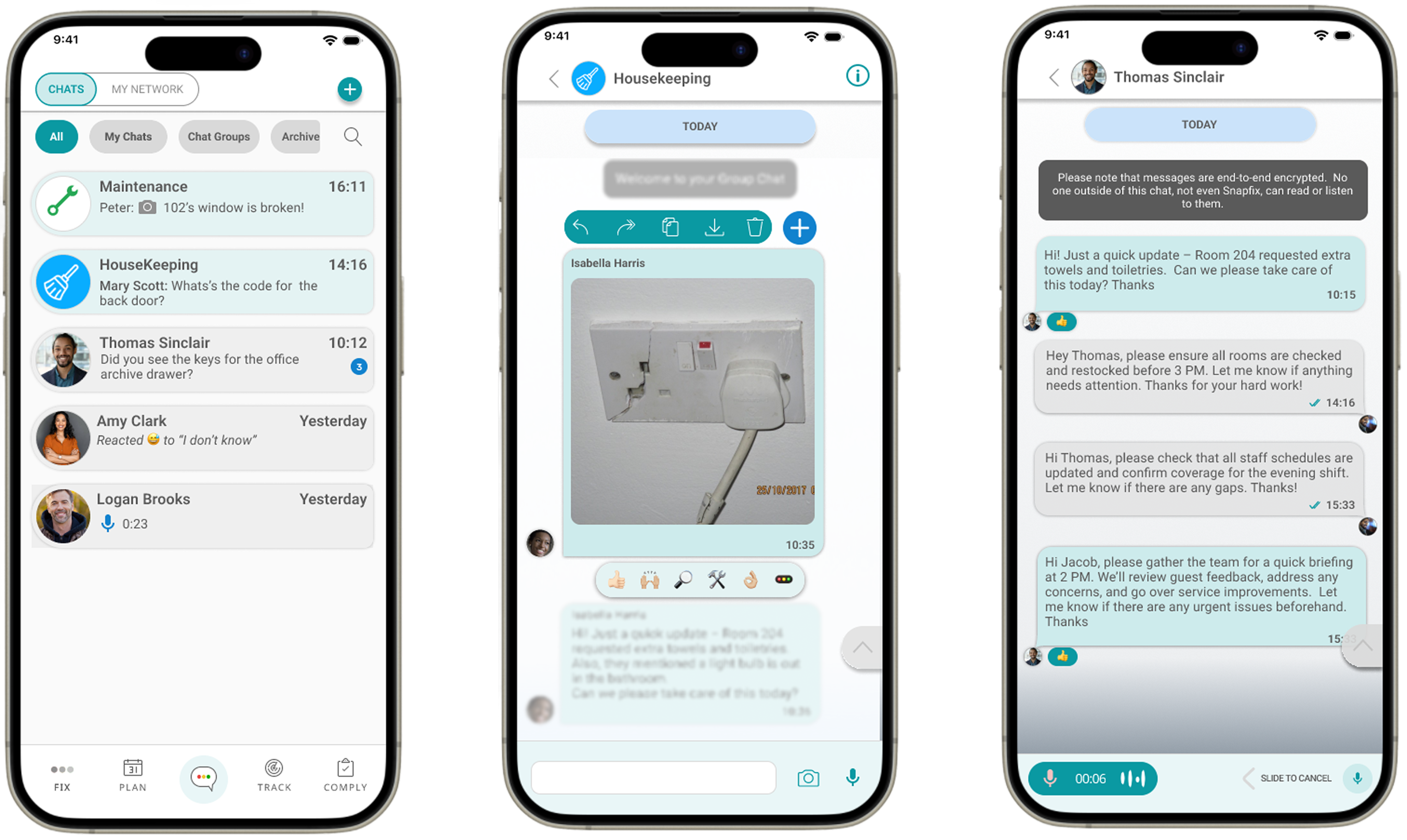
Chat experience grounded in familiar behaviour
Rather than introducing new behaviours, the interface builds on familiar patterns to support faster adoption.
Chats, groups, and message info are structured to keep conversations organised and easy to navigate
Audio messages allow quick updates when typing isn’t practical
Sharing, forwarding, and reactions support quick communication without interrupting workflows
“My Network” gives visibility of all users while protecting personal phone numbers
Tasks can be created directly from messages, turning conversations into actions
9 | Validation
The feature was introduced quietly to existing customers already using Snapfix for daily operations.
Teams picked it up immediately. No onboarding was needed. The patterns were familiar enough - the interface followed the same conventions as the messaging apps teams were already using. That part worked.
Where managers actively introduced Chat, teams adopted it and communication shifted into the platform. Where they didn't, external apps remained the default. The feature worked - the gap was now in how it was rolled out, not in what it did.
That pointed to something important: bringing communication into a work platform isn't just a design decision. It requires the business to support the change too.
One finding changed the direction of the feature.
We expected privacy to be a concern for individual users - people not wanting their personal messages visible. What emerged was the opposite. Businesses wanted control. Many had already dealt with inappropriate behaviour in external messaging apps and had no way to intervene. Inside Snapfix, they wanted visibility, the ability to moderate, and clear accountability over how their teams communicated.
That led to three specific changes:
- Admin access to messages
- The ability to delete messages
- Greater control over communication settings
Other signals reinforced the value of keeping communication inside the product. Users appreciated not having to share personal phone numbers with colleagues. Teams reported that communication felt more appropriate inside a dedicated work tool. Reliance on external apps decreased where adoption was strong.
The model worked. What determined success wasn't the feature itself - it was how teams were led.
10 | Impact
Chat didn't add a feature to Snapfix. It changed where work happened.
Before, communication lived outside the product. Issues were discussed in WhatsApp, decisions were made in side conversations, and tasks were created in Snapfix afterwards - if they were created at all.
After Chat, that sequence collapsed into one place. A message became a task. A task was tracked. Work got done.
Before → WhatsApp → discussion → Snapfix → manual task creation (if any)
After → Chat → task created → tracked → completed
The shift showed up in usage. Over 50 million messages were exchanged within Snapfix - not as a side effect, but as a signal that daily team coordination had genuinely moved into the platform.
Customer feedback reflected the same thing. Teams highlighted how quickly they picked it up and how naturally it fit into how they already worked.
9 | Reflection
Teams picked up the feature immediately. The patterns were familiar - close enough to the messaging apps they already used that there was no learning curve. That part worked.
But familiarity alone didn't change behaviour.
Where Chat was introduced by managers, teams used it and communication moved into the platform. Where it wasn't, external apps stayed the default. The feature was ready. The conditions around it needed to catch up.
One finding shaped the next phase of the design.
The assumption was that users would value privacy - keeping personal and work communication separate. What emerged was different. Businesses needed control. They wanted visibility over team communication, the ability to moderate it, and clear accountability over what was said inside a work context. Many had already experienced problems with unmonitored messaging in external apps and had no way to intervene.
That shifted the design from personal messaging toward structured, work-based communication - built around the needs of the organisation, not just the individual user.
Next Iteration
The first version proved the model. The next step is building on it.
- Document and video sharing
- A web version for desktop use
- Admin controls over messages
- Option to restrict image uploads to camera only
- Expanded emoji and reactions
Teams were already communicating constantly. Chat gave that behaviour a place inside the product, with the structure and accountability that a work context requires.
The behaviour didn't change. The structure around it did.
About me
Get in Touch


ANDRE
GOUVEA
Closing the Communication Gap
BEHAVIOURAL INSIGHT
UX DESIGN
PRODUCT STRATEGY
Communication lived outside the product, making Snapfix secondary.
- Product: Snapfix ( mobile)
- Problem: Communication happening outside the product. No operational traceability
- My Role: Led UX strategy, concept, and design from idea to delivery
- Outcome: Introduced an integrated communication layer, shifting daily team coordination into Snapfix and connecting conversations directly to operational workflows
1 |Intro
As part of the core product, I led the design of an integrated communication system, enabling teams to coordinate work, share updates, and create tasks directly within the platform.
The challenge was not to design a chat feature, but to bring an existing behaviour into the product without disrupting how teams already work.
2 |Opportunity
When I looked at how teams were coordinating work, Snapfix wasn’t part of that process.
Communication was happening elsewhere.
Teams were using messaging apps to report issues, share photos, and organise daily tasks. Snapfix was only used afterwards - if at all.
That created a consistent set of problems:
- Work discussed but not tracked
- Tasks created late or missed entirely
- No visibility over communication
- Decisions disconnected from operations
This wasn’t a communication problem.It was an adoption problem.
3 |Outcome
Introduced a communication capability within Snapfix, expanding the product beyond task tracking into real-time team coordination.
The feature aligned with existing user behaviour, making it immediately usable without training.
Communication, task creation, and coordination became part of the same workflow.
The simplicity of the interface saves valuable time and improves internal communication, which has a direct positive impact on our daily operations and service quality”
Customer review
Hotel Tech Report→
How did I get here?
4 | My Role
I led the end-to-end design of the chat system, from early concept and behavioural framing through to interaction design and implementation support.
I worked closely with product and engineering to define how communication would integrate with existing workflows, ensuring it supported real operational use rather than functioning as a standalone feature.
5 | Research
Product and Customer Success teams were already aware that communication was happening outside Snapfix.
To understand why, I spoke with hotel staff across roles and observed how teams coordinated work in practice.
What I saw:
- Messaging apps were used daily across all teams
- Issues were reported through photos and quick messages
- Communication was fast, informal, and continuous
- Snapfix was used mainly for formal task tracking
- Adoption was affected by this split behaviour
Across teams, the pattern was consistent.
Work started in chat. Snapfix came later.
This defined the opportunity: bring communication into the same place where work is tracked.
6 | Key Challenge
The challenge was not building chat.
It was designing something that could replace an existing habit.
Users needed to:
- Communicate as quickly as they already do
- Recognise the interface instantly
- Move from conversation to action without friction
At the same time, the system needed to:
- Maintain structure and traceability
- Connect communication with operational workflows
7 | Design Decisions
The intention was not to introduce chat as a separate feature, but to make it feel like a natural extension of how Snapfix already works.
Users were already familiar with messaging patterns (WhatsApp). Reusing those patterns reduced friction and made the system immediately usable.
Instead of keeping communication separate, it was directly connected to operational actions.
This ensured that conversations didn’t stay as messages - they became work.
Design Principles
FamiliarityInteraction patterns followed existing messaging behaviours
Speed and flowCommunication remained fast and lightweight
Operational integrationMessages could be turned into tasks without leaving the flow
Visibility and controlCommunication remained structured and traceable
8 | Solution
The solution introduced an integrated chat system within Snapfix.
Rather than acting as a standalone messaging tool, it was designed as part of the operational workflow.
For communication to work in practice, it needed to:
- Support real-time team coordination
- Allow quick sharing of issues and updates
- Enable task creation directly from messages
- Maintain structure across teams and departments
How it was structured
Chat groupsOrganised by teams, departments, or task groups
Broadcast channelManagers could communicate with all users
Task creation from messagesMessages and photos could be converted into tasks
Rich messagingImages, audio, quick replies, and familiar interactions
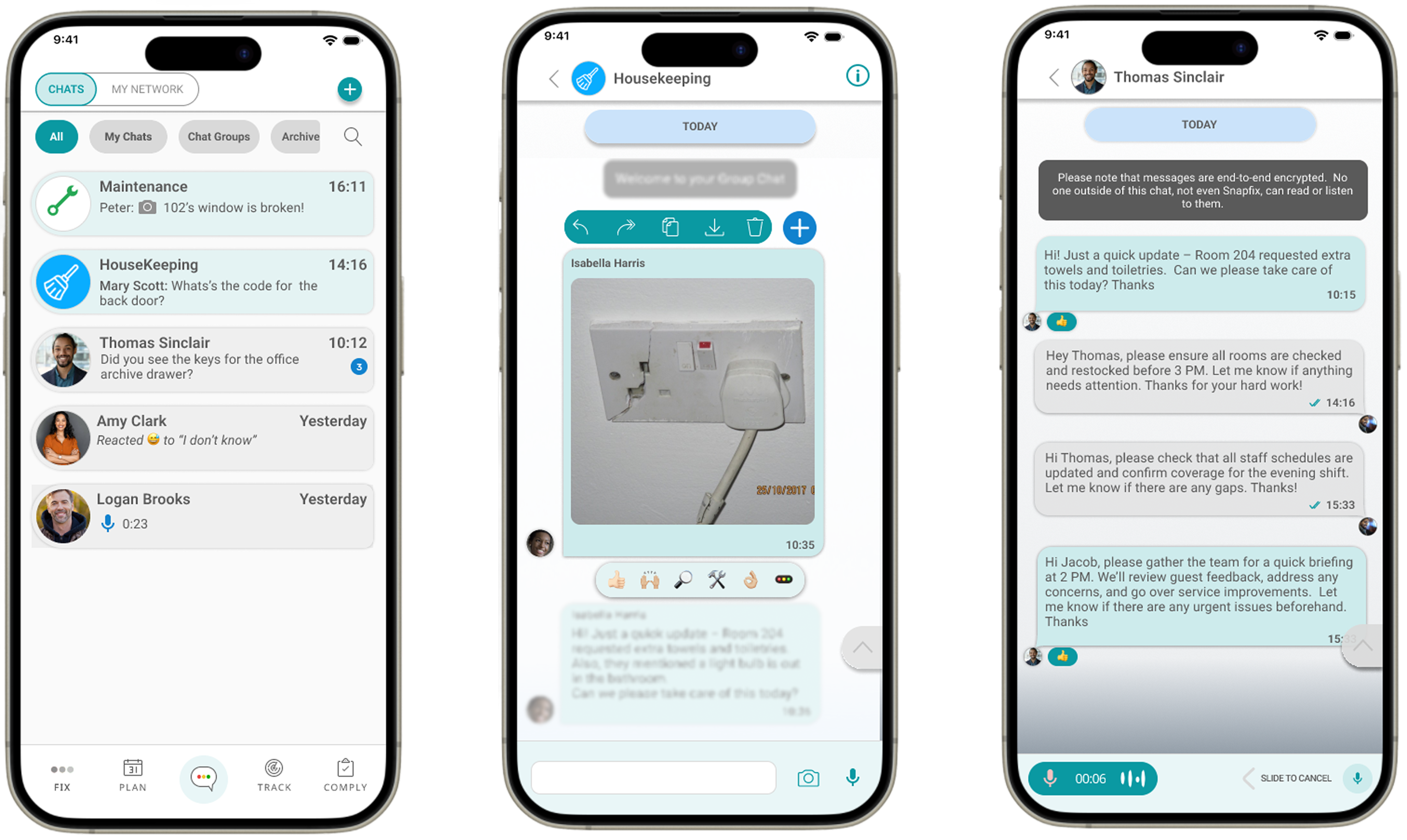
Chat experience grounded in familiar behaviour
Rather than introducing new behaviours, the interface builds on familiar patterns to support faster adoption.
Chats, groups, and message info are structured to keep conversations organised and easy to navigate
Audio messages allow quick updates when typing isn’t practical
Sharing, forwarding, and reactions support quick communication without interrupting workflows
“My Network” gives visibility of all users while protecting personal phone numbers
Tasks can be created directly from messages, turning conversations into actions
9 | Validation
The feature was introduced quietly to existing customers already using Snapfix for daily operations.
Teams picked it up immediately. No onboarding was needed. The patterns were familiar enough - the interface followed the same conventions as the messaging apps teams were already using. That part worked.
Where managers actively introduced Chat, teams adopted it and communication shifted into the platform. Where they didn't, external apps remained the default. The feature worked - the gap was now in how it was rolled out, not in what it did.
That pointed to something important: bringing communication into a work platform isn't just a design decision. It requires the business to support the change too.
One finding changed the direction of the feature.
We expected privacy to be a concern for individual users - people not wanting their personal messages visible. What emerged was the opposite. Businesses wanted control. Many had already dealt with inappropriate behaviour in external messaging apps and had no way to intervene. Inside Snapfix, they wanted visibility, the ability to moderate, and clear accountability over how their teams communicated.
That led to three specific changes:
- Admin access to messages
- The ability to delete messages
- Greater control over communication settings
Other signals reinforced the value of keeping communication inside the product. Users appreciated not having to share personal phone numbers with colleagues. Teams reported that communication felt more appropriate inside a dedicated work tool. Reliance on external apps decreased where adoption was strong.
The model worked. What determined success wasn't the feature itself - it was how teams were led.
10 | Impact
Chat didn't add a feature to Snapfix. It changed where work happened.
Before, communication lived outside the product. Issues were discussed in WhatsApp, decisions were made in side conversations, and tasks were created in Snapfix afterwards - if they were created at all.
After Chat, that sequence collapsed into one place. A message became a task. A task was tracked. Work got done.
Before → WhatsApp → discussion → Snapfix → manual task creation (if any)
After → Chat → task created → tracked → completed
The shift showed up in usage. Over 50 million messages were exchanged within Snapfix - not as a side effect, but as a signal that daily team coordination had genuinely moved into the platform.
Customer feedback reflected the same thing. Teams highlighted how quickly they picked it up and how naturally it fit into how they already worked.
9 | Reflection
Teams picked up the feature immediately. The patterns were familiar - close enough to the messaging apps they already used that there was no learning curve. That part worked.
But familiarity alone didn't change behaviour.
Where Chat was introduced by managers, teams used it and communication moved into the platform. Where it wasn't, external apps stayed the default. The feature was ready. The conditions around it needed to catch up.
One finding shaped the next phase of the design.
The assumption was that users would value privacy - keeping personal and work communication separate. What emerged was different. Businesses needed control. They wanted visibility over team communication, the ability to moderate it, and clear accountability over what was said inside a work context. Many had already experienced problems with unmonitored messaging in external apps and had no way to intervene.
That shifted the design from personal messaging toward structured, work-based communication - built around the needs of the organisation, not just the individual user.
Next Iteration
The first version proved the model. The next step is building on it.
- Document and video sharing
- A web version for desktop use
- Admin controls over messages
- Option to restrict image uploads to camera only
- Expanded emoji and reactions
Teams were already communicating constantly. Chat gave that behaviour a place inside the product, with the structure and accountability that a work context requires.
The behaviour didn't change. The structure around it did.
About me
Get in Touch

ANDRE
GOUVEA
Closing the Communication Gap
BEHAVIOURAL INSIGHT
UX DESIGN
PRODUCT STRATEGY
Communication lived outside the product, making Snapfix secondary.
- Product: Snapfix ( mobile)
- Problem: Communication happening outside the product. No operational traceability.
- My Role: Led UX strategy, concept, and design from idea to delivery
- Outcome: Introduced an integrated communication layer, shifting daily team coordination into Snapfix and connecting conversations directly to operational workflows
1 |Intro
As part of the core product, I led the design of an integrated communication system, enabling teams to coordinate work, share updates, and create tasks directly within the platform.
The challenge was not to design a chat feature, but to bring an existing behaviour into the product without disrupting how teams already work.
2 |Opportunity
When I looked at how teams were coordinating work, Snapfix wasn’t part of that process.
Communication was happening elsewhere.
Teams were using messaging apps to report issues, share photos, and organise daily tasks. Snapfix was only used afterwards - if at all.
That created a consistent set of problems:
- Work discussed but not tracked
- Tasks created late or missed entirely
- No visibility over communication
- Decisions disconnected from operations
This wasn’t a communication problem.It was an adoption problem.
3 |Outcome
Introduced a communication capability within Snapfix, expanding the product beyond task tracking into real-time team coordination.
The feature aligned with existing user behaviour, making it immediately usable without training.
Communication, task creation, and coordination became part of the same workflow.
“The simplicity of the interface saves valuable time and improves internal communication, which has a direct positive impact on our daily operations and service quality”
How did I get here?
4 | My Role
I led the end-to-end design of the chat system, from early concept and behavioural framing through to interaction design and implementation support.
I worked closely with product and engineering to define how communication would integrate with existing workflows, ensuring it supported real operational use rather than functioning as a standalone feature.
5 | Research
Product and Customer Success teams were already aware that communication was happening outside Snapfix.
To understand why, I spoke with hotel staff across roles and observed how teams coordinated work in practice.
What I saw:
- Messaging apps were used daily across all teams
- Issues were reported through photos and quick messages
- Communication was fast, informal, and continuous
- Snapfix was used mainly for formal task tracking
- Adoption was affected by this split behaviour
Across teams, the pattern was consistent.
Work started in chat. Snapfix came later.
This defined the opportunity: bring communication into the same place where work is tracked.
6 | Key Challenge
The challenge was not building chat.
It was designing something that could replace an existing habit.
Users needed to:
- Communicate as quickly as they already do
- Recognise the interface instantly
- Move from conversation to action without friction
At the same time, the system needed to:
- Maintain structure and traceability
- Connect communication with operational workflows
7 | Design Decisions
The intention was not to introduce chat as a separate feature, but to make it feel like a natural extension of how Snapfix already works.
Users were already familiar with messaging patterns (WhatsApp). Reusing those patterns reduced friction and made the system immediately usable.
Instead of keeping communication separate, it was directly connected to operational actions.
This ensured that conversations didn’t stay as messages - they became work.
Design Principles
FamiliarityInteraction patterns followed existing messaging behaviours
Speed and flowCommunication remained fast and lightweight
Operational integrationMessages could be turned into tasks without leaving the flow
Visibility and controlCommunication remained structured and traceable
8 | Solution
The solution introduced an integrated chat system within Snapfix.
Rather than acting as a standalone messaging tool, it was designed as part of the operational workflow.
For communication to work in practice, it needed to:
- Support real-time team coordination
- Allow quick sharing of issues and updates
- Enable task creation directly from messages
- Maintain structure across teams and departments
How it was structured
Chat groupsOrganised by teams, departments, or task groups
Broadcast channelManagers could communicate with all users
Task creation from messagesMessages and photos could be converted into tasks
Rich messagingImages, audio, quick replies, and familiar interactions
Chat experience grounded in familiar behaviour
Rather than introducing new behaviours, the interface builds on familiar patterns to support faster adoption.
Chats, groups, and message info are structured to keep conversations organised and easy to navigate
Audio messages allow quick updates when typing isn’t practical
Sharing, forwarding, and reactions support quick communication without interrupting workflows
“My Network” gives visibility of all users while protecting personal phone numbers
Tasks can be created directly from messages, turning conversations into actions
9 | Validation
The feature was introduced quietly to existing customers already using Snapfix for daily operations.
Teams picked it up immediately. No onboarding was needed. The patterns were familiar enough - the interface followed the same conventions as the messaging apps teams were already using. That part worked.
Where managers actively introduced Chat, teams adopted it and communication shifted into the platform. Where they didn't, external apps remained the default. The feature worked - the gap was now in how it was rolled out, not in what it did.
That pointed to something important: bringing communication into a work platform isn't just a design decision. It requires the business to support the change too.
One finding changed the direction of the feature.
We expected privacy to be a concern for individual users - people not wanting their personal messages visible. What emerged was the opposite. Businesses wanted control. Many had already dealt with inappropriate behaviour in external messaging apps and had no way to intervene. Inside Snapfix, they wanted visibility, the ability to moderate, and clear accountability over how their teams communicated.
That led to three specific changes:
- Admin access to messages
- The ability to delete messages
- Greater control over communication settings
Other signals reinforced the value of keeping communication inside the product. Users appreciated not having to share personal phone numbers with colleagues. Teams reported that communication felt more appropriate inside a dedicated work tool. Reliance on external apps decreased where adoption was strong.
The model worked. What determined success wasn't the feature itself - it was how teams were led.
10 | Impact
Chat didn't add a feature to Snapfix. It changed where work happened.
Before, communication lived outside the product. Issues were discussed in WhatsApp, decisions were made in side conversations, and tasks were created in Snapfix afterwards - if they were created at all.
After Chat, that sequence collapsed into one place. A message became a task. A task was tracked. Work got done.
Before → WhatsApp → discussion → Snapfix → manual task creation (if any)
After → Chat → task created → tracked → completed
The shift showed up in usage. Over 50 million messages were exchanged within Snapfix - not as a side effect, but as a signal that daily team coordination had genuinely moved into the platform.
Customer feedback reflected the same thing. Teams highlighted how quickly they picked it up and how naturally it fit into how they already worked.
9 | Reflection
Teams picked up the feature immediately. The patterns were familiar - close enough to the messaging apps they already used that there was no learning curve. That part worked.
But familiarity alone didn't change behaviour.
Where Chat was introduced by managers, teams used it and communication moved into the platform. Where it wasn't, external apps stayed the default. The feature was ready. The conditions around it needed to catch up.
One finding shaped the next phase of the design.
The assumption was that users would value privacy - keeping personal and work communication separate. What emerged was different. Businesses needed control. They wanted visibility over team communication, the ability to moderate it, and clear accountability over what was said inside a work context. Many had already experienced problems with unmonitored messaging in external apps and had no way to intervene.
That shifted the design from personal messaging toward structured, work-based communication - built around the needs of the organisation, not just the individual user.
Next Iteration
The first version proved the model. The next step is building on it.
- Document and video sharing
- A web version for desktop use
- Admin controls over messages
- Option to restrict image uploads to camera only
- Expanded emoji and reactions
Teams were already communicating constantly. Chat gave that behaviour a place inside the product, with the structure and accountability that a work context requires.
The behaviour didn't change. The structure around it did.
About me
Get in Touch